테스트 코드
작성한 코드가 의도대로 동작하고 예상하지 못한 문제가 없는지 확인하기 위해서 작성하는 코드입니다
테스트 코드를 작성하는 패턴이 있습니다 given-when-then 입니다 현재 프로젝트도 이 패턴으로 구현할 겁니다
given-when-then 패턴
- given: 테스트 실행을 준비하는 단계
- when: 테스트를 진행하는 단계
- then: 테스트 결과를 검증하는 단계
Spring Boot에서는 spring-boot-starter-test에서 테스트를 위한 도구와 어노테이션을 제공하고 있습니다
Spring Boot 애플리케이션을 생성하면 기본으로 적용되는 의존성 리스트입니다
따로 의존성을 추가해 줄 필요는 없습니다
implementation 'org.springframework.boot:spring-boot-starter'
testImplementation 'org.springframework.boot:spring-boot-starter-test'
testRuntimeOnly 'org.junit.platform:junit-platform-launcher'
JUnit
자바 언어를 위한 단위 테스트 프레임워크
단위 테스트는 작성한 코드가 의도대로 작동하는지 작은 단위로 검증하는 테스트입니다
JUnit을 통해서 단위별로 테스트를 작성하여 테스트를 진행하는 데 사용합니다
@BeforAll
- 전체 테스트를 시작하기 전에 처음으로 한 번만 실행
- DB 연결 및 테스트 환경을 초기화에 주로 사용
- static으로 선언해야 함
@BeforEach
- 테스트 케이스를 시작하기 전에 매번 실행
- 테스트 메서드에 사용되는 객체를 초기화 및 테스트에 필요한 값을 적용
- static으로 선언하지 않음
@AfterAll
- 전체 테스트를 마치고 종료하기 전에 한 번만 실행
- DB 연결 종료 및 자원 해제에 사용
- static으로 선언해야 함
@AfterEach
- 테스트 케이스를 종료하기 전에 실행
- 특정 데이터를 삭제에 사용
- static으로 선언하지 않음
테스트 코드 작성
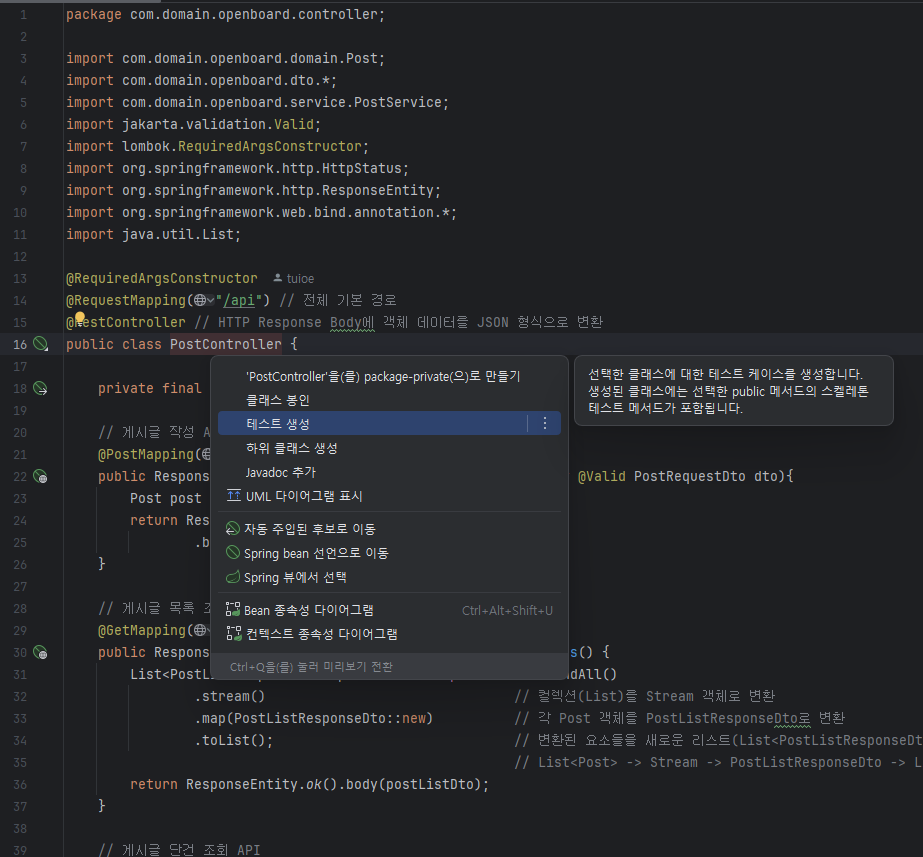
저는 컨트롤러의 단위 테스트를 진행하기 위해서 테스트 코드를 생성하겠습니다
클래스 이름에 마우스 커서를 올리고 Alt+Enter를 누르면 탭이 생성됩니다 여기서 테스트 생성을 눌러 생성할 수 있습니다
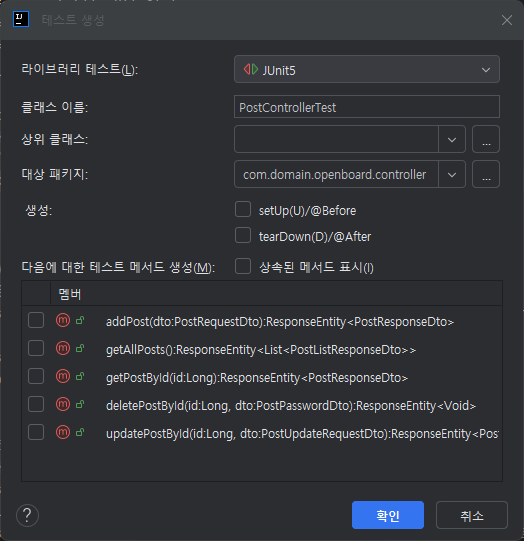
테스트 생성에서 확인을 눌러 테스트 코드를 작성할 클래스를 만들어줍니다
@SpringBootTest // 테스트용 애플리케이션 컨텍스트 생성
@AutoConfigureMockMvc // MockMvc 생성 및 자동 구성
class PostControllerTest {

    //  테스트용 HTTP 요청을 수행할 MockMvc 객체 (Spring MVC 환경을 흉내냄)
    @Autowired
    protected MockMvc mockMvc;

    // 객체 → JSON, JSON → 객체 변환을 위한 Jackson Mapper
    @Autowired
    protected ObjectMapper objectMapper;

    // Spring 컨텍스트(WebApplicationContext) 주입 → MockMvc 설정에 필요
    @Autowired
    private WebApplicationContext webApplicationContext;

    // 실제 DB 접근을 위한 Repository (테스트 중 직접 조회/삭제 등에 사용)
    @Autowired
    PostRepository postRepository;

    // 비밀번호 암호화를 위한 PasswordEncoder
    @Autowired
    PasswordEncoder passwordEncoder;

    @BeforeEach
    public void mockMvcSetup() {
        // 테스트 시작 전마다 MockMvc를 WebApplicationContext 기반으로 다시 세팅
        this.mockMvc = MockMvcBuilders.webAppContextSetup(this.webApplicationContext).build();

        // 테스트 격리를 위해 모든 게시글 데이터를 초기화 (DB clean up)
        postRepository.deleteAll();
    }
}
테스트 환경을 만들고 테스트에 필요한 객체를 선언해 줍니다
- MockMvc
실제 서버를 띄우지 않고 HTTP 요청을 전송할 수 있는 가상의 Spring MVC 테스트 환경입니다
컨트롤러의 엔드포인트를 테스트할 때 사용합니다 - ObjectMapper
Java 객체를 JSON 문자열로 변환하거나 JSON 문자열을 Java 객체로 역직렬화할 때 사용됩니다
요청 또는 응답의 Body를 처리하는 데 사용합니다 - WebApplicationContext
Spring의 전체 애플리케이션 컨텍스트입니다 MockMvc를 초기화할 때 필요한 설정 정보를 제공합니다 - PostRepository
테스트에서 서비스 계층을 거치지 않고 직접 DB에 데이터를 저장하거나 조회하기 위해 사용합니다
주로 테스트의 Given 또는 Then 단계에서 활용됩니다 - PasswordEncoder
Spring Security에서 제공하는 비밀번호 암호화 도구입니다
비밀번호 저장 시 반드시 암호화를 수행하고,matches() 메서드를 통해 입력값과 저장된 암호화 비밀번호를 비교합니다
게시글 작성 테스트 코드
@DisplayName("addPost: 게시글 작성에 성공한다")
@Test
public void addPost() throws Exception {

    // Given (테스트 준비)

    // 게시글 추가에 필요한 요청 객체를 만들기
    final String url = "/api/posts";
    final String title = "title";
    final String content = "content";
    final String name = "name";
    final String password = "password";
    final PostRequestDto dto = new PostRequestDto(title, content, name, password);

    // 객체 JSON으로 직렬화 (DTO를 JSON 문자열로 변환)
    final String requestBody = objectMapper.writeValueAsString(dto);

    // when (테스트 진행)

    // JSON 형태로 POST 요청 전송
    ResultActions resultActions = mockMvc.perform(post(url)
            .contentType(MediaType.APPLICATION_JSON_VALUE)  // Content-Type : application_json_value
            .content(requestBody));                         // 요청 본문

    // then (테스트의 결과를 검증)

    // HTTP 응답 코드가 201 Created인지 검증
    resultActions.andExpect(status().isCreated());

    // 실제 DB에 저장된 데이터
    List<Post> posts = postRepository.findAll();

    // 게시글이 하나 저장되어 있는지 검증
    assertThat(posts.size()).isEqualTo(1);

    // 저장된 게시글의 필드가 입력값과 같은지 검증
    assertThat(posts.get(0).getTitle()).isEqualTo(title);
    assertThat(posts.get(0).getContent()).isEqualTo(content);
    assertThat(posts.get(0).getName()).isEqualTo(name);

    // 저장된 비밀번호는 암호화 되어 있어 matches() 메서드로 입력 비밀번호와 같은지 검증
    assertThat(passwordEncoder.matches(password, posts.get(0).getPassword())).isTrue();
}
게시글 추가를 위한 데이터를 선언하고 DTO 객체에 담아서 "api/posts" URL으로 POST 메서드로 요청을 보냅니다
응답을 받고 HTTP 응답 코드를 확인하고 저장된 게시글과 작성한 게시글의 데이터가 같은지 검증하여 테스트를 종료합니다
게시글 목록 조회 테스트 코드
@DisplayName("findAllPosts: 게시글 목록 조회에 성공한다")
@Test
public void findAllPosts() throws Exception {

    // Given (테스트 준비)
    final String url = "/api/posts";
    final String title = "title";
    final String content = "content";
    final String name = "name";
    final String password = "password";

    // 게시글을 DB에 직접 저장 (조회 테스트용)
    postRepository.save(Post.builder()
            .title(title)
            .content(content)
            .name(name)
            .password(password)  // 이 테스트에선 암호화 X
            .build());

    // when (테스트 진행)

    // 게시글 목록 조회 GET 요청 (Accept: application/json)
    final ResultActions resultActions = mockMvc.perform(get(url).contentType(MediaType.APPLICATION_JSON_VALUE));

    // then (테스트의 결과를 검증)
    resultActions
            // 1. 응답 코드가 200 OK인지 확인
            .andExpect(status().isOk())
            .andExpect(jsonPath("$[0].title").value(title))
            .andExpect(jsonPath("$[0].content").value(content))
            .andExpect(jsonPath("$[0].name").value(name));
}
게시글 추가를 위한 데이터를 선언하고 이번에는 직접 Repository에 접근하여 게시글 데이터를 저장합니다
"api/posts" URL으로 GET메서드로 요청을 보냅니다 응답받은 값과 작성한 값을 비교하여 검증하고 테스트를 종료합니다
게시글 단건 조회 테스트 코드
@DisplayName("findPost: 게시글 단건 조회을 성공한다")
@Test
public void findPost() throws Exception {

    // Given (테스트 준비)
    final String url = "/api/posts/{id}";
    final String title = "title";
    final String content = "content";
    final String name = "name";
    final String password = "password";

    // 게시글을 DB에 직접 저장 (조회 테스트용)
    Post post = postRepository.save(Post.builder()
            .title(title)
            .content(content)
            .name(name)
            .password(password) // 이 테스트에선 암호화 X
            .build());

    // when (테스트 진행)

    // 게시글 목록 조회 GET 요청
    final ResultActions resultActions = mockMvc.perform(get(url,post.getPost_id()));

    // then (테스트의 결과를 검증)
    resultActions
            .andExpect(status().isOk())
            .andExpect(jsonPath("$.title").value(title))
            .andExpect(jsonPath("$.content").value(content))
            .andExpect(jsonPath("$.name").value(name));

}
게시글 추가를 위한 데이터를 선언하고 이번에도 Repository에 접근해서 게시글 데이터를 저장합니다
단건 조회도 목록 조회와 방식은 동일합니다
게시글 삭제 테스트 코드
@DisplayName("deletePost: 게시글 삭제에 성공한다")
@Test
public void deletePost() throws Exception {

    // Given (테스트 준비)
    final String url = "/api/posts/{id}";
    final String title = "title";
    final String content = "content";
    final String name = "name";
    final String password = "password";

    // 게시글을 DB에 직접 저장 (조회 테스트용)
    Post savePost = postRepository.save(Post.builder()
            .title(title)
            .content(content)
            .name(name)
            .password(passwordEncoder.encode(password)) // 서비스 계층을 거치지 않아서 암호화된 패스워드 저장
            .build());

    // 비밀번호를 포함한 요청 DTO 생성
    final PostPasswordDto postPasswordDto = new PostPasswordDto(password);
    String requestBody = objectMapper.writeValueAsString(postPasswordDto);

    // when (테스트 진행)
    // Delete 메서드로 요청, contentType = JSON
    mockMvc.perform(delete(url,savePost.getPost_id())
            .contentType(MediaType.APPLICATION_JSON_VALUE)
            .content(requestBody))
            .andExpect(status().isOk());

    Optional<Post> post = postRepository.findById(savePost.getPost_id());

    // then (테스트의 결과를 검증)

    // 삭제한 글이 존재하는지 검증
    Assertions.assertThat(post).isEmpty();
}
게시글 추가를 위해 데이터를 선언하고 DB에 직접 데이터를 저장합니다
서비스 계층을 거치지 않고 직접 데이터를 저장하여 비밀번호의 암호화가 이루어지지 않아 실제 서비스 로직에서 에러가 발생하여 테스트가 실패하기 때문에 DB에 데이터를 저장할 때 비밀번호를 암호화하여 저장합니다
// 입력 받은 password와 게시글에 저장된 password를 비교
if(!passwordEncoder.matches(inputPassword,post.getPassword())){
    throw new PasswordMismatchException();
}
Service 클래스에서 게시글 삭제 로직의 비밀번호 확인 방법을 보면 암호화한 비밀번호를 복호화할 수 없어 PasswordEncoder의 matches 메서드를 활용하여 확인하는 방식입니다
Repository로 직접 접근해서 데이터를 저장한다면 암호화 작업이 이루어지지 않아서 실질적으로 저장되는 비밀번호는 평문으로 저장되기 때문에 matches 메서드의 내부적으로 암호화되지 않은 값은 무조건 false를 반환하기 때문에 테스트에 실패하게 됩니다
게시글 수정 테스트 코드
@DisplayName("updatePost: 게시글 수정에 성공한다")
@Test
public void updateArticle() throws Exception {

    // Given (테스트 준비)
    final String url = "/api/posts/{id}";
    final String title = "title";
    final String content = "content";
    final String name = "name";
    final String password = "password";

    // 게시글을 DB에 직접 저장 (조회 테스트용)
    Post savePost = postRepository.save(Post.builder()
            .title(title)
            .content(content)
            .name(name)
            .password(passwordEncoder.encode(password)) // 서비스 계층을 거치지 않아서 암호화된 패스워드 저장
            .build());

    // 수정한 데이터
    final String updateTitle = "updateTitle";
    final String updateContent = "updateContent";

    PostUpdateRequestDto request = new PostUpdateRequestDto(updateTitle, updateContent,password);
    String requestBody = objectMapper.writeValueAsString(request);

    // when (테스트 진행)
    // PUT 메서드로 요청, contentType = JSON
    ResultActions result = mockMvc.perform(put(url,savePost.getPost_id())
            .contentType(MediaType.APPLICATION_JSON_VALUE)
            .content(requestBody));

    // then (테스트의 결과를 검증)
    result.andExpect(status().isOk());

    Post post = postRepository.findById(savePost.getPost_id()).get();

    // 기존값과 수정된 값이 같은지 검증
    Assertions.assertThat(post.getTitle()).isEqualTo(updateTitle);
    Assertions.assertThat(post.getContent()).isEqualTo(updateContent);
}
테스트 순서는 삭제와 비슷하게 진행됩니다 여기서 다른 점은 수정한 데이터를 선언하여 DTO를 통해 put 메서드로 요청을 보내고 저장된 데이터를 가져와 수정한 데이터와 같은지 검증하는 작업이 이루어집니다
PostControllerTest
package com.domain.openboard.controller;

import com.domain.openboard.domain.Post;
import com.domain.openboard.dto.PostPasswordDto;
import com.domain.openboard.dto.PostRequestDto;
import com.domain.openboard.dto.PostUpdateRequestDto;
import com.domain.openboard.repository.PostRepository;
import com.fasterxml.jackson.databind.ObjectMapper;
import org.assertj.core.api.Assertions;
import org.junit.jupiter.api.BeforeEach;
import org.junit.jupiter.api.DisplayName;
import org.junit.jupiter.api.Test;
import org.springframework.beans.factory.annotation.Autowired;
import org.springframework.boot.test.autoconfigure.web.servlet.AutoConfigureMockMvc;
import org.springframework.boot.test.context.SpringBootTest;
import org.springframework.http.MediaType;
import org.springframework.security.crypto.password.PasswordEncoder;
import org.springframework.test.web.servlet.MockMvc;
import org.springframework.test.web.servlet.ResultActions;
import org.springframework.test.web.servlet.setup.MockMvcBuilders;
import org.springframework.web.context.WebApplicationContext;
import java.util.List;
import java.util.Optional;
import static org.assertj.core.api.AssertionsForClassTypes.assertThat;
import static org.springframework.test.web.servlet.request.MockMvcRequestBuilders.*;
import static org.springframework.test.web.servlet.result.MockMvcResultMatchers.jsonPath;
import static org.springframework.test.web.servlet.result.MockMvcResultMatchers.status;

@SpringBootTest
@AutoConfigureMockMvc
class PostControllerTest {

    //  테스트용 HTTP 요청을 수행할 MockMvc 객체 (Spring MVC 환경을 흉내냄)
    @Autowired
    protected MockMvc mockMvc;

    // 객체 → JSON, JSON → 객체 변환을 위한 Jackson Mapper
    @Autowired
    protected ObjectMapper objectMapper;

    // Spring 컨텍스트(WebApplicationContext) 주입 → MockMvc 설정에 필요
    @Autowired
    private WebApplicationContext webApplicationContext;

    // 실제 DB 접근을 위한 Repository (테스트 중 직접 조회/삭제 등에 사용)
    @Autowired
    PostRepository postRepository;

    // 비밀번호 암호화를 위한 PasswordEncoder
    @Autowired
    PasswordEncoder passwordEncoder;

    @BeforeEach
    public void mockMvcSetup() {
        // 테스트 시작 전마다 MockMvc를 WebApplicationContext 기반으로 다시 세팅
        this.mockMvc = MockMvcBuilders.webAppContextSetup(this.webApplicationContext).build();

        // 테스트 격리를 위해 모든 게시글 데이터를 초기화 (DB clean up)
        postRepository.deleteAll();
    }

    @DisplayName("addPost: 게시글 작성에 성공한다")
    @Test
    public void addPost() throws Exception {

        // Given (테스트 준비)

        // 게시글 추가에 필요한 요청 객체를 만들기
        final String url = "/api/posts";
        final String title = "title";
        final String content = "content";
        final String name = "name";
        final String password = "password";
        final PostRequestDto dto = new PostRequestDto(title, content, name, password);

        // 객체 JSON으로 직렬화 (DTO를 JSON 문자열로 변환)
        final String requestBody = objectMapper.writeValueAsString(dto);

        // when (테스트 진행)

        // JSON 형태로 POST 요청 전송
        ResultActions resultActions = mockMvc.perform(post(url)
                .contentType(MediaType.APPLICATION_JSON_VALUE)  // Content-Type : application_json_value
                .content(requestBody));                         // 요청 본문

        // then (테스트의 결과를 검증)

        // HTTP 응답 코드가 201 Created인지 검증
        resultActions.andExpect(status().isCreated());

        // 실제 DB에 저장된 데이터
        List<Post> posts = postRepository.findAll();

        // 게시글이 하나 저장되어 있는지 검증
        assertThat(posts.size()).isEqualTo(1);

        // 저장된 게시글의 필드가 입력값과 같은지 검증
        assertThat(posts.get(0).getTitle()).isEqualTo(title);
        assertThat(posts.get(0).getContent()).isEqualTo(content);
        assertThat(posts.get(0).getName()).isEqualTo(name);

        // 저장된 비밀번호는 암호화 되어 있어 matches() 메서드로 입력 비밀번호와 같은지 검증
        assertThat(passwordEncoder.matches(password, posts.get(0).getPassword())).isTrue();
    }

    @DisplayName("findAllPosts: 게시글 목록 조회에 성공한다")
    @Test
    public void findAllPosts() throws Exception {

        // Given (테스트 준비)
        final String url = "/api/posts";
        final String title = "title";
        final String content = "content";
        final String name = "name";
        final String password = "password";

        // 게시글을 DB에 직접 저장 (조회 테스트용)
        postRepository.save(Post.builder()
                .title(title)
                .content(content)
                .name(name)
                .password(password)  // 이 테스트에선 암호화 X
                .build());

        // when (테스트 진행)

        // 게시글 목록 조회 GET 요청 (Accept: application/json)
        final ResultActions resultActions = mockMvc.perform(get(url).contentType(MediaType.APPLICATION_JSON_VALUE));

        // then (테스트의 결과를 검증)
        resultActions
                // 1. 응답 코드가 200 OK인지 확인
                .andExpect(status().isOk())
                .andExpect(jsonPath("$[0].title").value(title))
                .andExpect(jsonPath("$[0].content").value(content))
                .andExpect(jsonPath("$[0].name").value(name));
    }

    @DisplayName("findPost: 게시글 단건 조회을 성공한다")
    @Test
    public void findPost() throws Exception {

        // Given (테스트 준비)
        final String url = "/api/posts/{id}";
        final String title = "title";
        final String content = "content";
        final String name = "name";
        final String password = "password";

        // 게시글을 DB에 직접 저장 (조회 테스트용)
        Post post = postRepository.save(Post.builder()
                .title(title)
                .content(content)
                .name(name)
                .password(password) // 이 테스트에선 암호화 X
                .build());

        // when (테스트 진행)

        // 게시글 목록 조회 GET 요청
        final ResultActions resultActions = mockMvc.perform(get(url,post.getPost_id()));

        // then (테스트의 결과를 검증)
        resultActions
                .andExpect(status().isOk())
                .andExpect(jsonPath("$.title").value(title))
                .andExpect(jsonPath("$.content").value(content))
                .andExpect(jsonPath("$.name").value(name));

    }

    @DisplayName("deletePost: 게시글 삭제에 성공한다")
    @Test
    public void deletePost() throws Exception {

        // Given (테스트 준비)
        final String url = "/api/posts/{id}";
        final String title = "title";
        final String content = "content";
        final String name = "name";
        final String password = "password";

        // 게시글을 DB에 직접 저장 (조회 테스트용)
        Post savePost = postRepository.save(Post.builder()
                .title(title)
                .content(content)
                .name(name)
                .password(passwordEncoder.encode(password)) // 서비스 계층을 거치지 않아서 암호화된 패스워드 저장
                .build());

        // 비밀번호를 포함한 요청 DTO 생성
        final PostPasswordDto postPasswordDto = new PostPasswordDto(password);
        String requestBody = objectMapper.writeValueAsString(postPasswordDto);

        // when (테스트 진행)
        // Delete 메서드로 요청, contentType = JSON
        mockMvc.perform(delete(url,savePost.getPost_id())
                .contentType(MediaType.APPLICATION_JSON_VALUE)
                .content(requestBody))
                .andExpect(status().isOk());

        Optional<Post> post = postRepository.findById(savePost.getPost_id());

        // then (테스트의 결과를 검증)

        // 삭제한 글이 존재하는지 검증
        Assertions.assertThat(post).isEmpty();
    }

    @DisplayName("updatePost: 게시글 수정에 성공한다")
    @Test
    public void updateArticle() throws Exception {

        // Given (테스트 준비)
        final String url = "/api/posts/{id}";
        final String title = "title";
        final String content = "content";
        final String name = "name";
        final String password = "password";

        // 게시글을 DB에 직접 저장 (조회 테스트용)
        Post savePost = postRepository.save(Post.builder()
                .title(title)
                .content(content)
                .name(name)
                .password(passwordEncoder.encode(password)) // 서비스 계층을 거치지 않아서 암호화된 패스워드 저장
                .build());

        // 수정한 데이터
        final String updateTitle = "updateTitle";
        final String updateContent = "updateContent";

        PostUpdateRequestDto request = new PostUpdateRequestDto(updateTitle, updateContent,password);
        String requestBody = objectMapper.writeValueAsString(request);

        // when (테스트 진행)
        // PUT 메서드로 요청, contentType = JSON
        ResultActions result = mockMvc.perform(put(url,savePost.getPost_id())
                .contentType(MediaType.APPLICATION_JSON_VALUE)
                .content(requestBody));

        // then (테스트의 결과를 검증)
        result.andExpect(status().isOk());

        Post post = postRepository.findById(savePost.getPost_id()).get();

        // 기존값과 수정된 값이 같은지 검증
        Assertions.assertThat(post.getTitle()).isEqualTo(updateTitle);
        Assertions.assertThat(post.getContent()).isEqualTo(updateContent);
    }
}
단위 테스트 결과
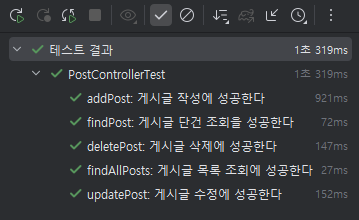
생성/조회/수정/삭제의 테스트가 성공적으로 완료되었습니다
시간이 되면 이전에 만들었던 유효성 검사에 대한 테스트도 진행해 보겠습니다
'구름톤 유니브 스터디' 카테고리의 다른 글
| [구름톤 유니브] 9oormthonUNIV 4기를 마무리 하며 (0) | 2025.10.16 |
|---|---|
| [구름톤 유니브] Spring 커뮤니티 게시판 @RestControllerAdvice 기반 전역 예외 처리 구조 설계 구현 (0) | 2025.03.30 |
| [구름톤 유니브] Spring 커뮤니티 게시판 validation을 이용한 유효성 검사를 구현 (0) | 2025.03.30 |
| [구름톤 유니브] Spring 커뮤니티 게시판 CRUD 만들기 2 (조회,수정,삭제 기능 제작) (0) | 2025.03.30 |
| [구름톤 유니브] Spring 커뮤니티 게시판 CRUD 만들기 1 (엔티티 생성,게시글 작성 기능) (0) | 2025.03.29 |